Building an Omarchy Govee Plugin
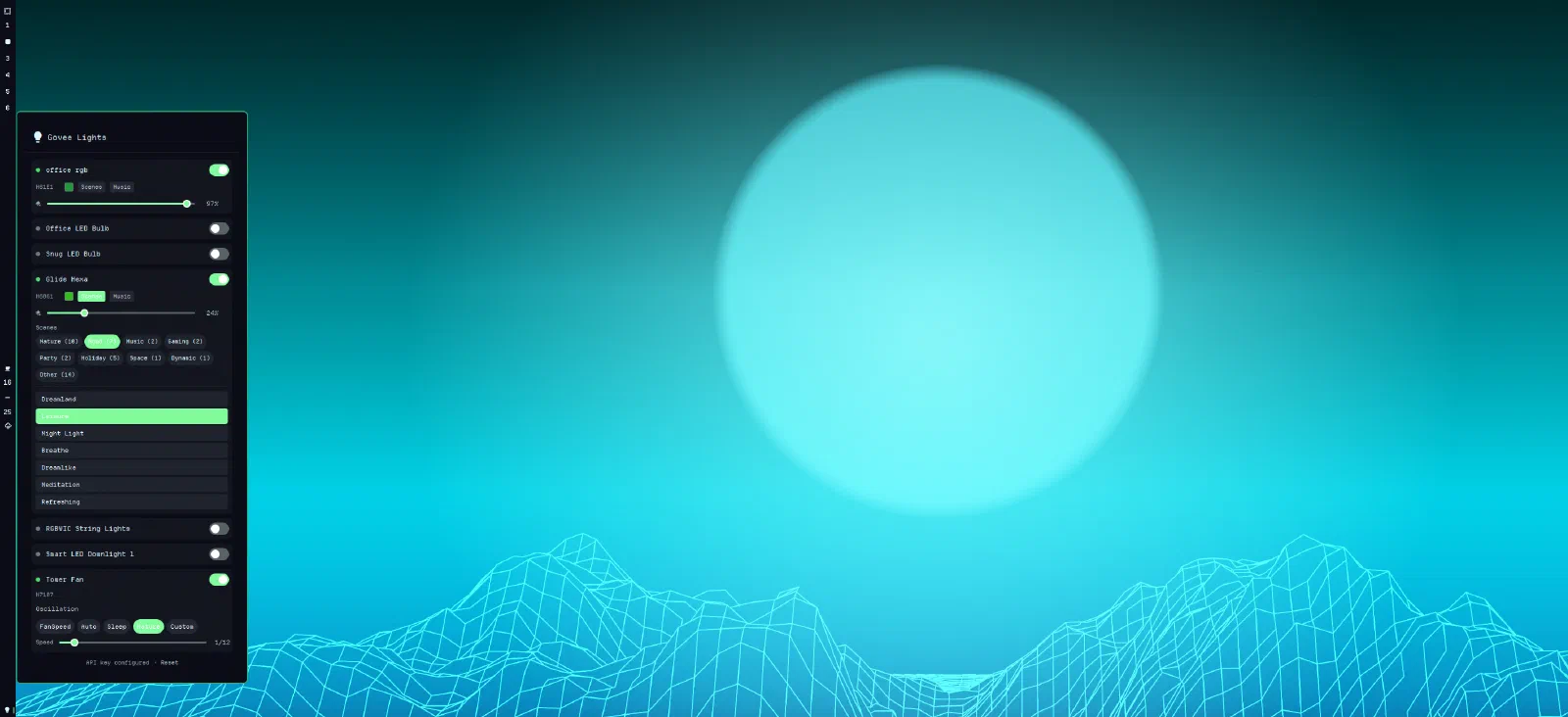
I wrote recently about switching to Omarchy and what it does for me as a development machine. One of the things I love about it is that when something is missing, you don't wait for a vendor roadmap—you build it. Omarchy recently released their Quattro release, which includes the ability to write custom plugins. I have always wanted a way to control my office Govee lights from my desktop, but controlling them meant reaching for a phone app every time. On a machine designed to keep me from breaking flow, that felt wrong. So I built omarchy-govee, a plugin that puts device control—power, brightness, colour, colour temperature, scenes, even fan modes—directly into the Omarchy bar. It means when I join a meeting, I can quickly turn off my room fan, and adjust my lights to something suitable. The plugin is now submitted to the omarchy-plugins directory.
Why a Plugin, Not Just a Script
Govee exposes a straightforward cloud API: list your devices, read their state, send capability commands. A shell script could technically drive that. But I wanted something that felt native—a bar widget I could glance at, a panel that opens with one click, sliders and colour pickers that respond immediately rather than round-tripping through a terminal. Omarchy's new plugin architecture (QML components backed by JS, wired into the shell via a manifest) gives you exactly that, without needing to fork the whole desktop to add one feature.
The shape of it ended up being simple and, I think, the right shape: a pure JavaScript API layer (GoveeApi.js) that knows nothing about UI—command building, response parsing, with colour math sitting underneath QML components (Panel.qml, DeviceCard.qml, ColorPicker.qml, SceneSelector.qml) that own state and presentation. No component reaches into another's internals. It's the kind of separation that pays for itself the moment you need to add a new device type, which I did partway through when I decided to add support for my Govee tower fan and needed oscillation and fan-mode controls alongside the lights.
Building It with an AI Agent
I built this with an AI coding agent, doing the implementation while I set direction and reviewed the output. This is where a post I wrote a while back about Vibe Coding becomes relevant to my own practice, not just theory.
The distinction I care about isn't "did AI write the code", it's whether the code got the same scrutiny it would have got from a human colleague. So I reviewed it like I would any pull request: read every file, checked the architecture held together, and dug into the details that actually break things in production. That review turned up real issues. A regex missing a /g flag that silently failed to trim pasted API keys, a half-finished rename where the "legacy alias" function was the one actually in use, a hand-rolled shell string building the one code path that handles a secret, no stderr capture anywhere in the network layer, and a global in-flight flag that let a command on one device block state updates for every other device.
None of those are things you'd catch by skimming the diff and thinking "looks reasonable." They needed reading the actual logic and asking "what happens when this races, when this input is empty, when two things happen at once." The agent fixed each one when pointed at it directly — including, on the third pass, tracking down a genuine race condition in a command queue where the fix for the first bug had introduced a second, subtler one (advancing a queue from the wrong process signal, which could stall it permanently under the right timing). That's the pattern that matters: AI moves fast on implementation, but the judgement about what "done" means, and the persistence to keep pushing until it actually is done, stays firmly a human job.
What It Does
- Toggle power and adjust brightness per device, right from the bar
- Full colour picker with RGB and colour temperature control
- Scene selection, auto-categorised from whatever Govee's API returns
- Fan support (oscillation, work modes) for devices beyond lighting
- Auto-refreshing state so the panel never goes stale while it's open
Getting It
If you're on Omarchy and have Govee devices, omarchy-govee is submitted to the plugins directory now—once it's live there, installation should be a single command. In the meantime the source is on GitHub if you want to try it early or see how it's put together.
Building your own tools for your own desktop is one of the better arguments for a system like Omarchy in the first place. Small gap, small plugin, and now my lights are one keystroke away instead of a phone unlock and an app launch.